RawJpgPairSync: RAW + JPG Pair Cleaner
A Python desktop app and CLI that keeps camera RAW + JPG pairs in sync. Delete one file of a pair while culling, and it finds the orphaned partner across 13 camera brands and sends it to the Recycle Bin after a preview.
Overview
RawJpgPairSync solves a small but constant annoyance of shooting RAW + JPG: every photo is written twice (DSC01234.JPG and DSC01234.ARW), but when culling you usually delete only the file you are looking at. The partner stays behind and quietly eats disk space.
The rule is simple: delete one, delete both. Point the app at a folder and it lists every JPG without its RAW and every RAW without its JPG, then moves them to the Recycle Bin in one click. There is no setup step and nothing is remembered between runs; the folder is evaluated as it is right now.
Desktop App
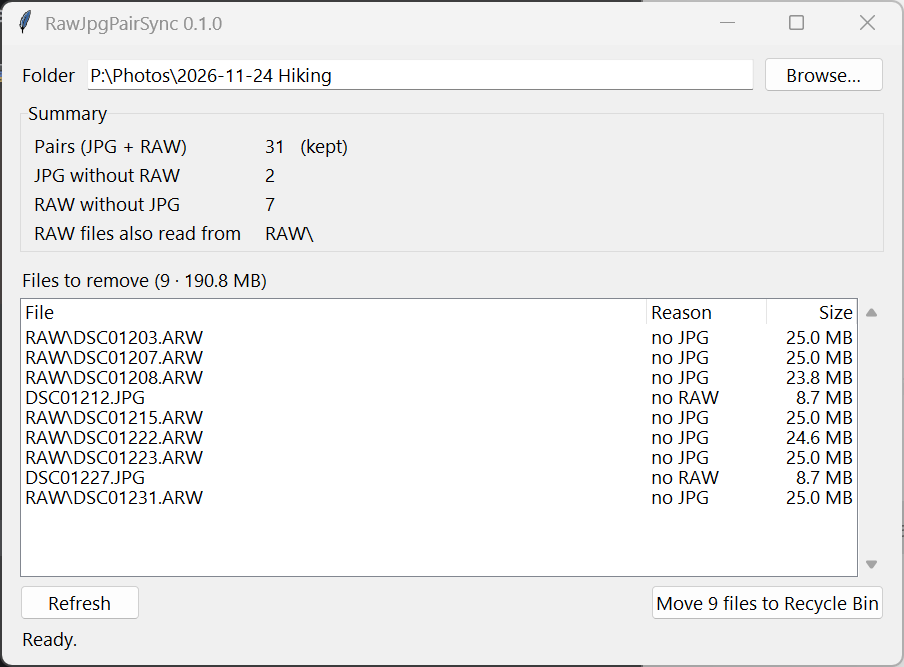
RAW\ subfolder, two JPGs) are listed with their reason and size before anything is moved.
Technical Stack
- Language: Python 3.11+
- Interface: tkinter GUI (no extra install) and an
argparseCLI, both built on the samecore.py - Deletion: send2trash for Recycle Bin moves, never a hard delete
- Config: optional
config.tomlread with the standard librarytomllib - Packaging: PyInstaller
--onefilebuilds a windowed.exeand a console.exethat run without Python installed - Testing: pytest suites for core, CLI, and GUI using temporary folders of fake camera files
How Pairing Works
Two files are a pair when they share a stem, compared case-insensitively, so dsc1.jpg and DSC1.ARW match.
- Previews:
.jpg,.jpeg,.heif,.hif, read from the selected folder. - RAWs: 20 extensions across Sony, Canon, Nikon, Fujifilm, Panasonic, Olympus/OM System, Pentax, Leica, Hasselblad, Phase One, Sigma, Samsung, and DNG. Brands can be mixed in one folder.
- Layouts: RAWs are found next to the JPGs or one level down in a subfolder such as
RAW\. If the same stem appears in several subfolders, all copies belong to the shot. - Untouched: anything with an unknown extension, such as
.xmpsidecars, is never touched.
Safety by Design
Because the tool’s whole job is removing files, the design leans hard on safety:
- Preview first. Nothing is removed without showing the list, unless the CLI is run with
-y. A-ndry run changes nothing. - Recycle Bin only. Every removal is recoverable, and each one is logged to
.rawjpgpairsync.login the folder. - Stale-list guard. Just before moving, the GUI rescans the folder. If the result differs from what the user confirmed (for example, more photos were culled without pressing Refresh), nothing is moved and the new list is shown instead.
- Batched with fallback. All files go to the Recycle Bin in a single call, which is several times faster than one call per file. If that call fails, the remaining files are retried one by one so the locked ones can be reported by name.
- Clear exit codes. The CLI returns distinct codes for success, cancel, bad input or config, and files that could not be removed, so it can be scripted.