PDF Invoice Renamer: Automated Regex Extraction & GUI
Desktop automation application in Python featuring both a Tkinter GUI and CLI mode that parses PDF invoices, extracts invoice numbers via configurable regex patterns, and automates bulk renaming with Unicode/Chinese support.
PythonTkinterRegexAutomationPDF ProcessingTOML
Overview
Managing corporate accounting receipts and electronic tax invoices often requires handling hundreds of cryptically named PDF downloads (e.g., download_948271.pdf).
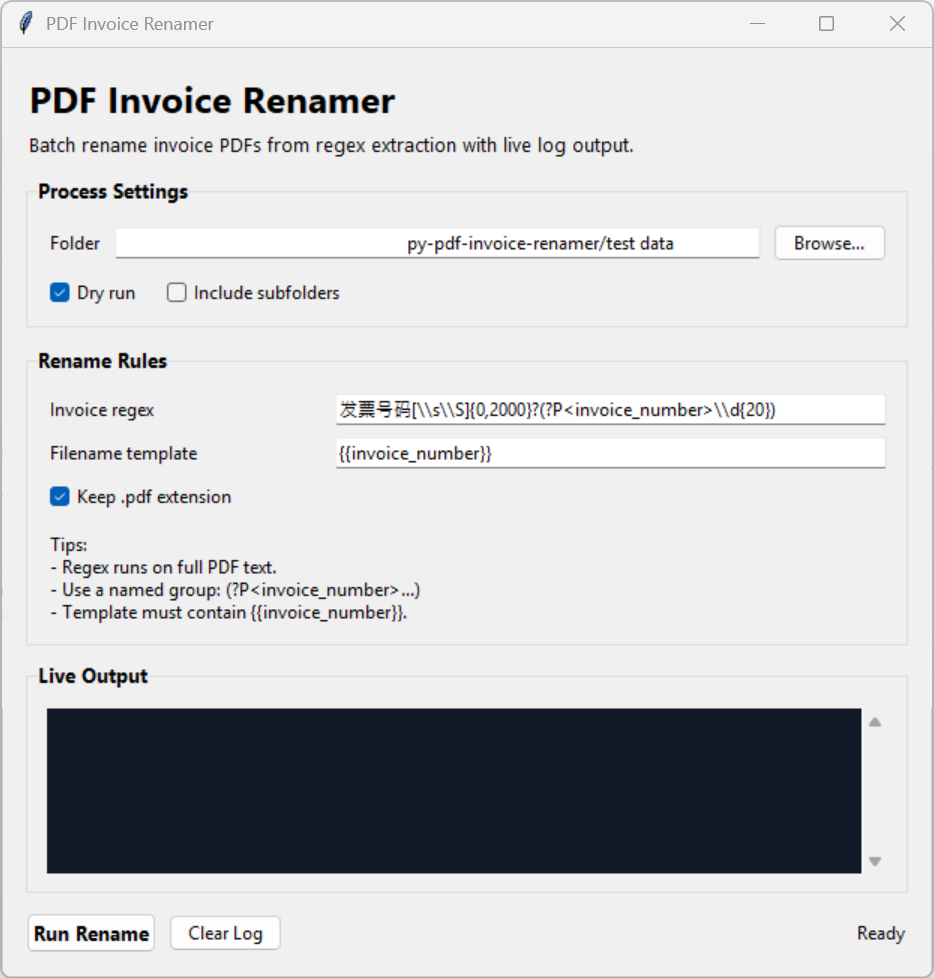
py-pdf-invoice-renamer is a desktop automation utility engineered to scan folders of PDF invoices, extract standardized invoice identifiers using configurable regular expressions, and bulk-rename them into structured naming conventions (such as 发票_{{invoice_number}}.pdf).
Desktop Interface & Workflow
Technical Stack & Architecture
- Language: Python 3.9+
- GUI Framework: Tkinter desktop interface with live execution log streams
- Configuration: TOML configuration parser (
config.toml) - Extraction Engine: Text parsing with full regex capture group prioritization
- Character Encoding: Native UTF-8 handling for Chinese and multi-byte Unicode strings
Key Features & Design Patterns
1. Dual Interface (CLI & GUI)
- GUI Mode (
gui.py): Intuitive desktop interface with folder selection, recursive directory checkboxes, real-time configuration editing, dry-run toggles, and live color-coded execution logs. - Headless CLI Mode (
invoice_renamer.py): Scriptable command-line interface suitable for automated cron jobs and server batch pipelines.
2. Flexible Regex Capture Priorities
Supports complex invoice extraction rules using hierarchical capture mechanisms:
- Explicit named capture group (
(?P<invoice_number>\d+)) - Positional capture group (
(\d{8,12})) - Full regex match fallback
3. Collision Resistance & Safe Dry-Runs
- Collision Protection: Checks target paths before renaming to prevent accidental file overwrites or data loss.
- Dry-Run Preview (
--dry-run): Simulates the entire extraction and renaming workflow, outputtingold_file.pdf -> new_file.pdfsummaries before committing any disk operations. - Filename Sanitization: Automatically normalizes illegal OS filesystem characters into safe underscores.