FlowMark: Batch Watermark Studio
A Python batch watermarking studio with a CustomTkinter GUI and CLI. It applies text and PNG sticker overlays, resizes by longest side, exports tuned JPEGs with EXIF orientation preserved, and can upload the finished set to Pixeldrain.
Overview
FlowMark is a Python studio for watermarking a folder of photographs in one pass. A CustomTkinter desktop app and an interactive CLI share the same processing pipeline: correct camera orientation, optionally downscale, composite a text line and a PNG sticker, then write high-quality JPEGs without touching the originals.
Settings live in a local config.json. After a batch finishes, FlowMark can upload the exports to Pixeldrain and return an album link.
Desktop Studio
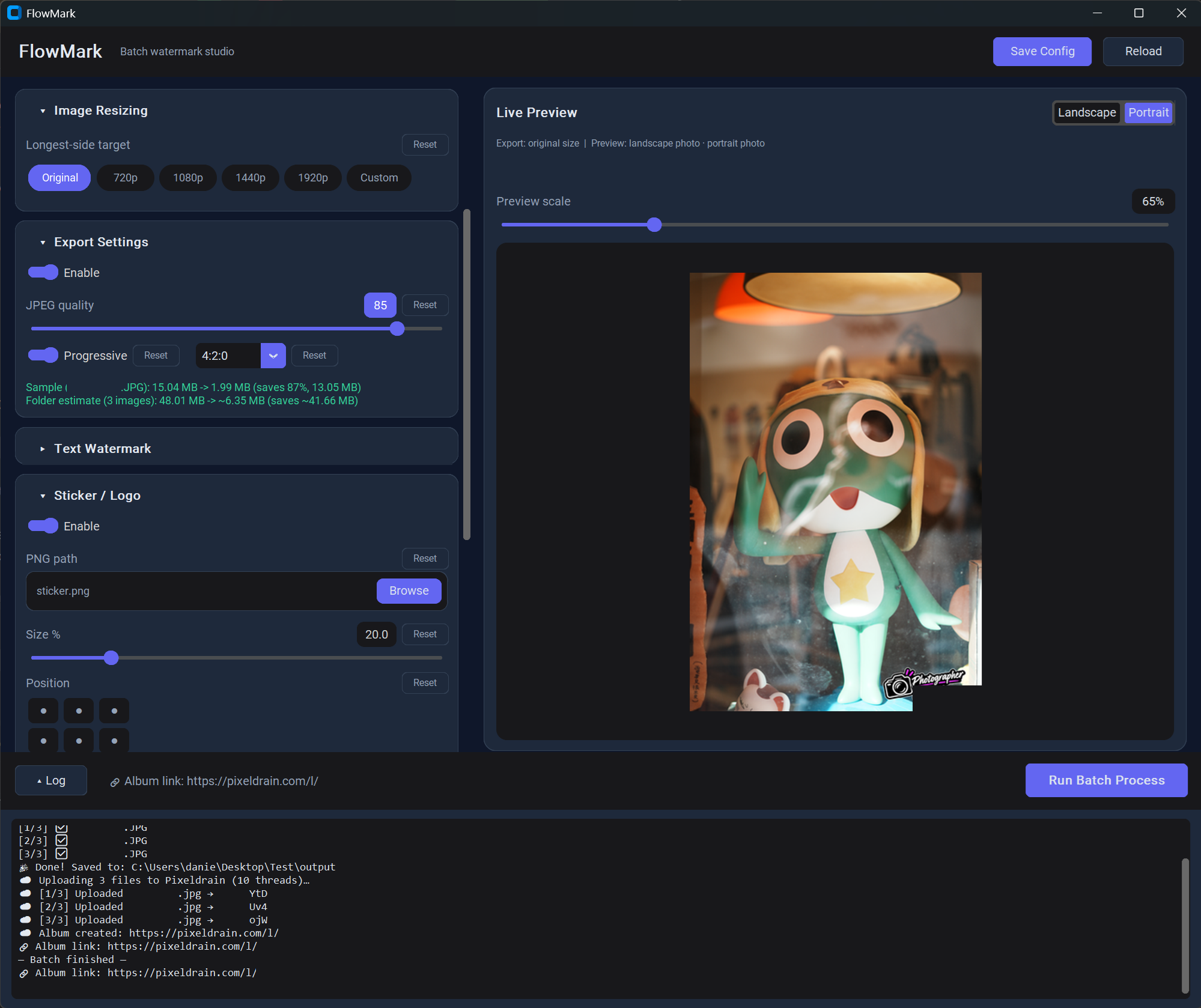
Technical Stack
- Language: Python 3.9+
- Imaging: Pillow for decode, EXIF transpose, Lanczos resize, alpha compositing, and JPEG encode
- Interface: CustomTkinter dark-theme desktop app, plus an interactive CLI
- Concurrency:
concurrent.futures.ThreadPoolExecutorfor batch encode and for cloud upload - Cloud: Pixeldrain HTTP API via the standard library (
urllib), with the API key kept in local config
Processing Pipeline
Each file runs through the same steps, whether the job was started from the GUI or the CLI:
- Orientation.
ImageOps.exif_transposebakes the camera orientation into the pixel buffer. The Orientation tag is then set to normal so viewers do not rotate the file a second time, and the rest of the EXIF block is written back on save. - Resize. An optional longest-side target (presets at 720, 1080, 1440, and 1920, or a custom pixel value) downscales with Lanczos. Images already smaller than the target are left alone.
- Text. A white TrueType overlay (Arial, with a bitmap fallback) is sized as a percentage of the longest side and anchored on a 3×3 grid with per-side padding.
- Sticker. A PNG with alpha is scaled the same way, aspect ratio kept, and clamped inside the padded frame so it cannot hang off the edge. If the sticker file itself sits in the input folder, it is skipped.
- JPEG. The composite is flattened onto white and saved with configurable quality, progressive encoding, and chroma subsampling (
4:4:4,4:2:2, or4:2:0). Output lands in anoutputfolder as.jpg.
Input is .jpg, .jpeg, and .png. Files are processed in alphabetical order so a later album matches the folder, not whichever thread finished first.
Key Features
1. Live Preview and Size Estimate
The GUI samples the first landscape and portrait photos in the selected folder and redraws the watermark on a debounced preview. A savings estimate runs the same resize and JPEG settings against the first image, then scales that ratio across the folder so the export size is visible before the batch starts.
2. Multithreaded Batch
Encoding is I/O and compression heavy, so the folder is handed to a worker pool sized to the CPU count. Each image keeps its index in the sorted list: threads may finish out of order, but the progress log and the upload queue stay aligned with the filenames.
3. Optional Pixeldrain Album
When cloud upload is enabled, finished JPEGs are PUT to Pixeldrain in parallel (1–32 workers) and grouped into a list. The album title defaults to the input folder name for that session and is not written back into config.json. The album URL is printed in the log when the upload completes.