HanziBoard: Chinese Pinyin Keyboard with CC-CEDICT Candidate Dictionary
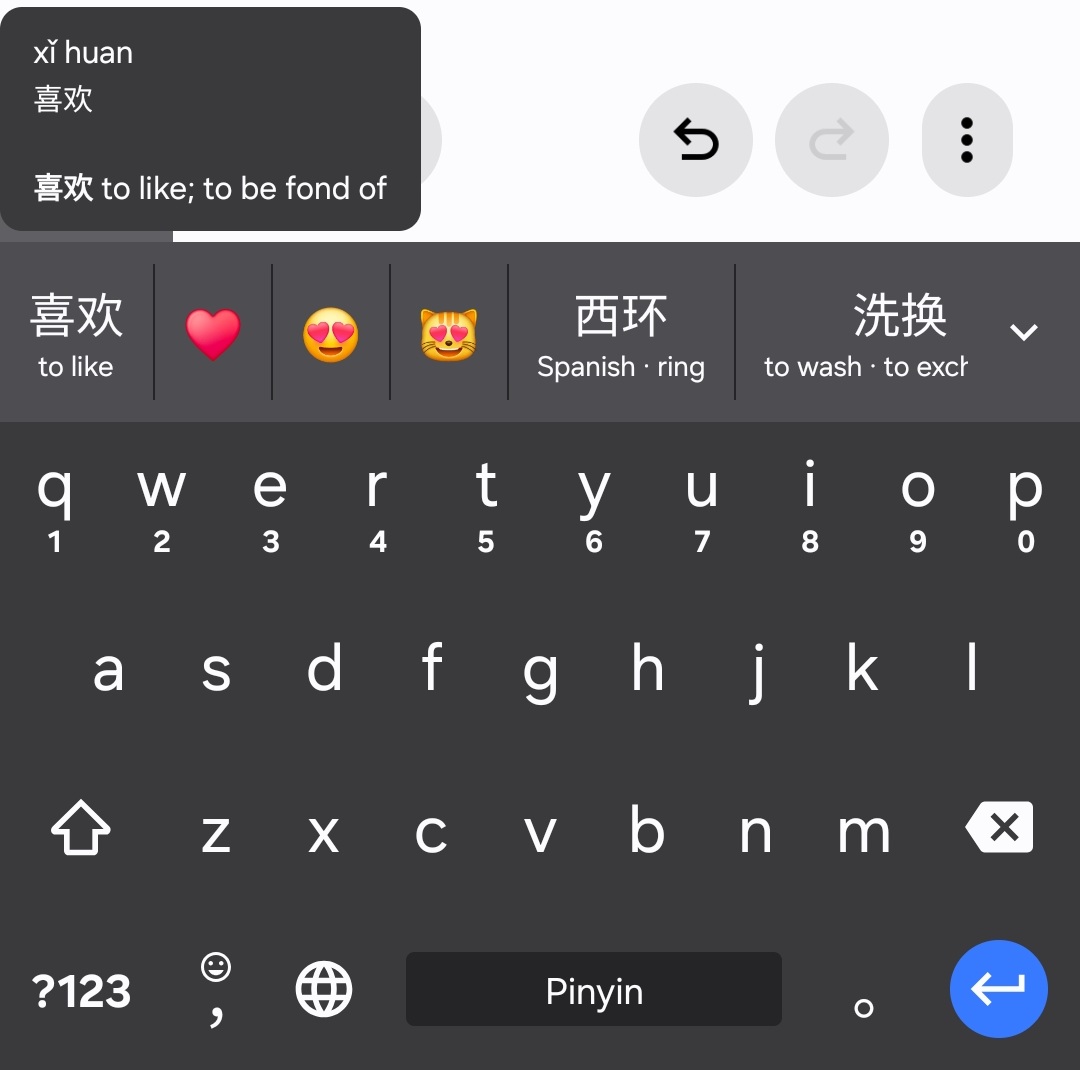
An Android input method forked from fcitx5-android that integrates an offline CC-CEDICT lexical database directly into the candidate suggestion bar, displaying contextual English definitions as Chinese characters are typed.
Overview
When typing Mandarin Chinese with standard Pinyin keyboards, foreign language learners frequently encounter a significant roadblock: Pinyin input relies heavily on homophones. A single pinyin string like shi can represent dozens of candidate characters (是, 时, 十, 事, 市, 实). Standard mobile keyboards display only the Chinese characters without translations, forcing learners to guess or constantly switch back and forth between messaging apps and third-party dictionary software.
HanziBoard solves this by embedding an offline CC-CEDICT Chinese-English dictionary directly inside the Android keyboard candidate bar. As the user types pinyin, each suggested Chinese candidate is accompanied by its corresponding English definition in real time.
Application Screenshot
Architecture & Technical Implementation
- Base Platform: Forked from fcitx5-android, a modular, robust open-source input method engine written in Kotlin, Java, and C++ (
libfcitx5). - Lexical Database: Optimized local SQLite database containing 120,000+ bilingual entries derived from CC-CEDICT.
- Query Latency: Sub-5ms indexed lookups on local SQLite, ensuring zero keystroke lag or stutter during rapid typing.
- Pinyin Support: Compatible with both standard Quanpin (full pinyin) and Shuangpin (double pinyin) input methods.
Why an Offline Dictionary?
A local offline dictionary was chosen over cloud translation APIs or AI models because a mobile keyboard must remain extremely fast, lightweight, and responsive. Calling external translation APIs on every keystroke would introduce network latency, API costs, and privacy concerns, while running AI models would consume too much memory and processing power, draining battery life and causing keyboard stutter. A local SQLite database delivers instant sub-5ms lookups with near-zero resource overhead and no network dependency.
Key Engineering Highlights
1. Seamless Candidate Bar UI Integration
In Android input method frameworks, rendering space above the keyboard layout is strictly constrained:
- Extended the candidate view layout (
CandidatesView) across horizontal scroll bars, floating prediction boxes, and expanded candidate grids. - Dynamically attaches an English gloss subtitle below each candidate item without breaking existing theme styling or key touch targets.
- Displays concise primary definitions derived from the scored dictionary pipeline, ensuring long multi-line glosses do not crowd out neighboring candidates.
2. Multi-Character Segmentation for Compound Words
When users type multi-syllable phrases (e.g., zhongwen → 中文), the dictionary engine uses greedy forward-matching to segment candidate character clusters into known vocabulary terms, fetching the compound translation rather than disjoint individual character meanings.
3. Long-Press Definition Cards & Hover Summary
- Hover / Long-Press: Long-pressing any candidate character in the suggestion bar immediately opens a detailed preview card displaying traditional/simplified variants, tone marks, and comprehensive definitions.
- Swipe-to-Lock: Swiping upwards on the preview card locks it into a scrollable modal, allowing users to study example definitions and secondary usages without leaving their active text conversation.
4. Zero-Latency Offline Execution
Mobile input methods must adhere to strict frame deadlines (under 16ms per frame to prevent keyboard stutter):
- The dictionary asset is opened through an optimized read-only SQLite connection (
CeDict) with targeted single-column indexes on simplified and traditional characters. - Query results are cached in an active memory buffer for current candidate sequences, ensuring fluid 60fps keyboard animation and responsive touch feedback.